
Overview
The Dispatching Central contact is the 24/7 on-call contact from your company's dispatching department. Operators use it when they need to reach you at short notice, so it must always be current. Typical reasons to update it include a move of your operational headquarters, a new on-call or backup phone number, or a new dispatching email address.
You cannot edit the Dispatching Central contact on the platform. To change it, you complete Form 1 (Change of Dispatching Central Contact) and send it to the PRISMA Customer Success Team, who updates the details for you.
The Dispatching Central contact is not the same as the Dispatching contact. You manage those yourself on the platform.
How It Works
Check your current details
- Log in to PRISMA.
- Open Settings.
- Under Company Settings, click Company Information.
- Scroll to the Dispatching Central section of the Shipper Related Information card.
The section shows the Dispatching Central Address, Telephone On Call, Backup Telephone, Fax, and Email currently on record. Note which of these need to change before you fill in the form.
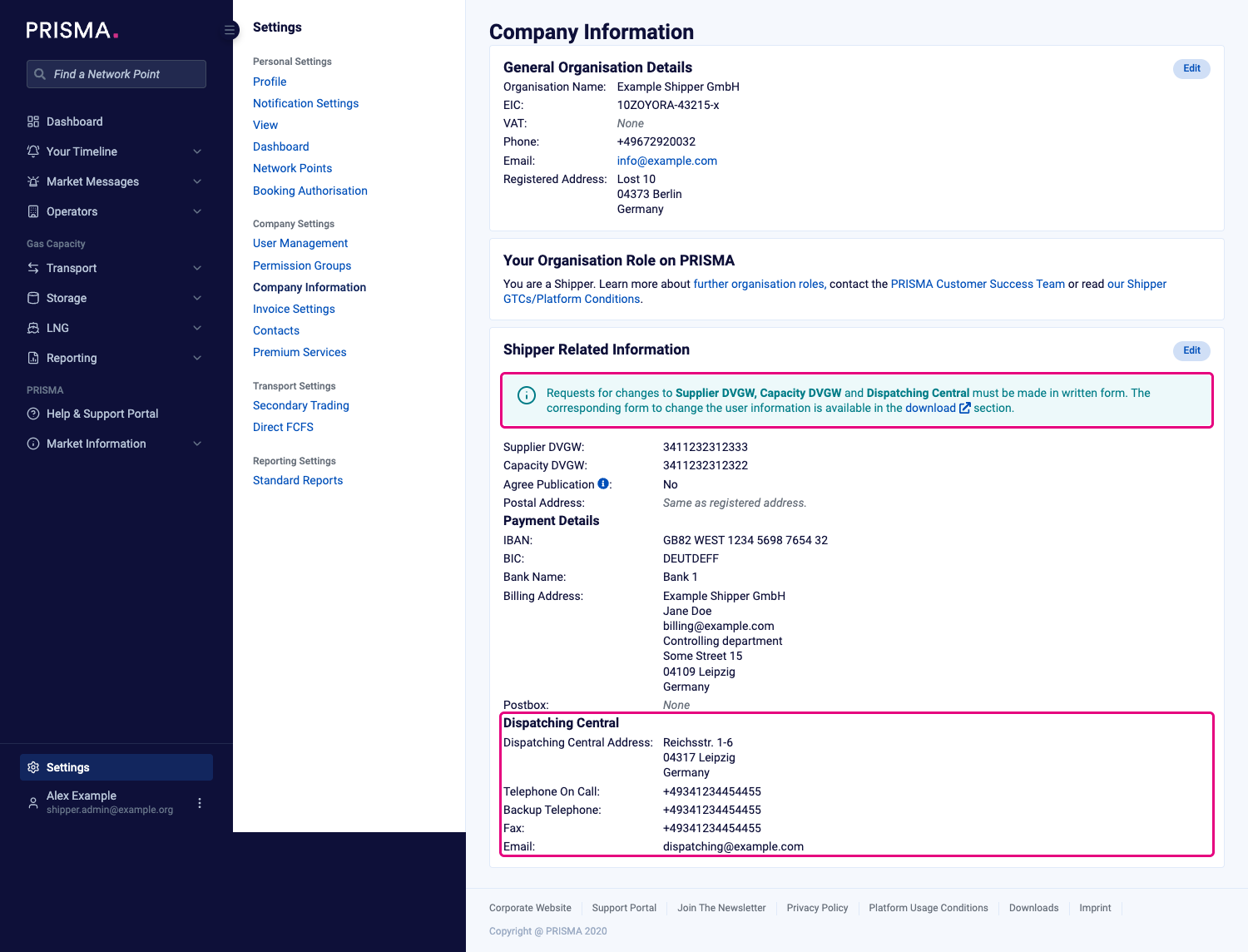
The Company Information page, with the notice about written changes and the Dispatching Central section highlighted.
Complete Form 1
- Download Form 1: Change of Dispatching (Central) Contact. You can also find it on the Download Forms page.
- Fill in the form in block letters.
- Under Form Initiator, enter your full name, email address, and telephone number. The form initiator must be a registered PRISMA user.
- Under Company Identification, enter your company name and company Energy Identification Code (EIC).
- Under New Contact Data, fill in only the fields that change. The table below lists the available fields.
- Optional: Enter a Date of validity if the new details should apply from a specific date.
- Sign the form twice: once as the form initiator, and once by a person entitled to sign on behalf of your company. Each signatory adds their place and date, full name, and position.
- Stamp the form with your company stamp. If your company has no stamp, write "N/A" in the Company Stamp field.
| Field | What to enter |
|---|---|
| Address, Postcode, City, Country | The new street address of your dispatching department |
| PO Box, PO Box Postcode, PO Box City | The new PO box details, if your dispatching department uses one |
| The new dispatching email address | |
| Phone On Call | The new 24/7 on-call phone number |
| Backup | The new backup phone number, used if the on-call number is unavailable |
| Fax | The new fax number |
| Date of validity | The date the new details take effect. If you leave it empty, the change applies from the next gas day. |
All fields marked with an asterisk (*) on the form are mandatory.
Send the form
To submit the request, email the stamped and twice-signed form to helpdesk@prisma-capacity.eu.
PRISMA cannot process a form that is missing a mandatory field, either signature, or the company stamp (or "N/A").
What Happens After Submission
The PRISMA Customer Success Team processes the form and updates your Dispatching Central contact. The new details apply from the Date of validity you entered, or from the next gas day if you left it empty.
Once the change is live, the new details appear in the Dispatching Central section of Company Information.