
Preliminary Instructions
To place a pre-bid in a storage offer, please ensure that:
a. you have an active assignment with the SSO.
b. the auction status is published.
c. your credit limit is sufficient to request the desired amount, otherwise your pre-bid will not turn into a bid at the opening of the auction.
Instructions
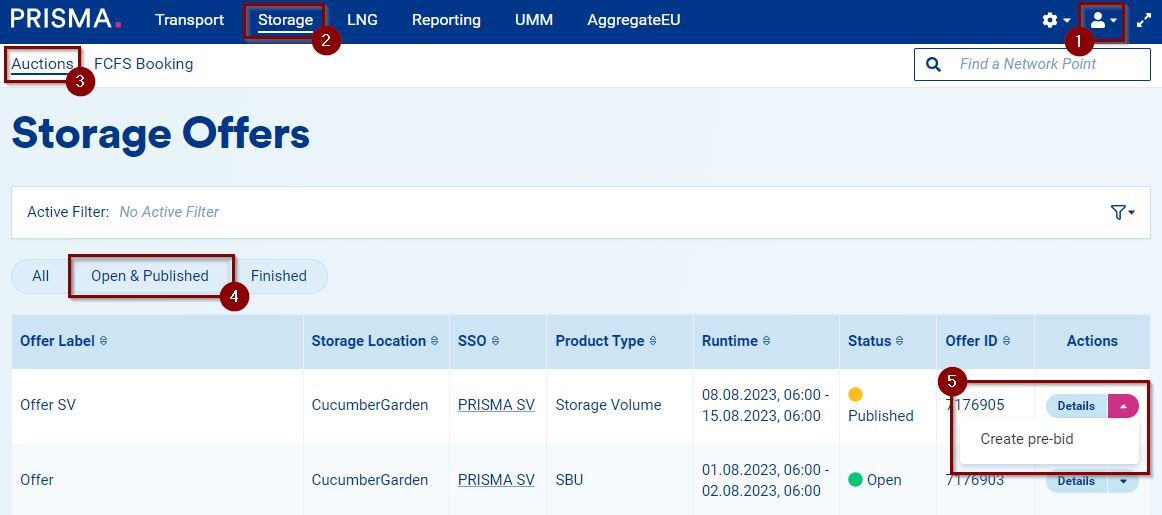
1. Log into your account;
2. Click on "Storage";
3. Select "Auctions" from the white menu;
4. Filter by the "Open & Published" auctions;
5. Click on the pink arrow next to the auction's details and select "Create pre-bid":
A form opens in which you can enter your pre-bid's details:
6. Min quantity: the minimum amount of capacity you are willing to buy.
7. Max quantity: the maximum amount of capacity you are willing to buy.
8. Price: the monetary value you are willing to pay.
9. (If applicable) Long-term contract: the contract applicable to a particular storage offer.

After you have entered the details of your pre-bid:
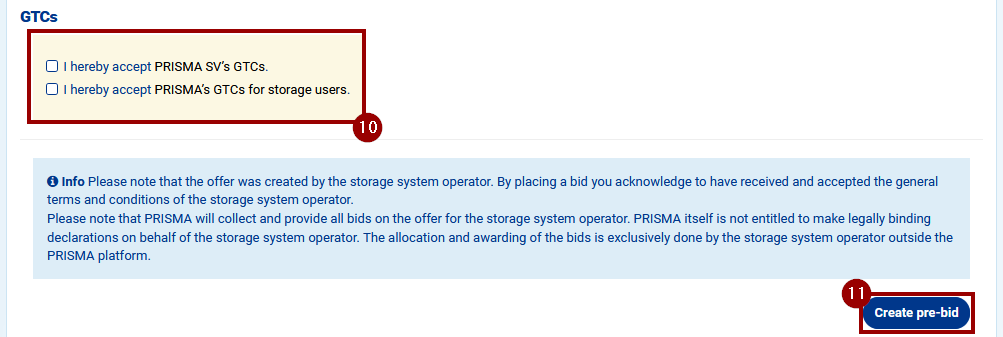
10. Accept the GTCs of the SSO and of PRISMA;
11. Click on "Create pre-bid".
Your pre-bid will be visible either in your activity feed or at the end of the auction's details page, where it can also be deleted.