
Overview
An arrears invoice charges a fee for a payment you made late. The operator calculates it from the number of days the original invoice stayed unpaid. If a Transmission System Operator (TSO) you are assigned to uses PRISMA's contract management service, you can find, download and review its invoices, including arrears invoices, on PRISMA.
Only shipper admins, and users a shipper admin has authorised to view company invoices, can see invoices.
For further information, please consult: How to Authorize Users to View Only Company Invoices?
Finding an Arrears Invoice
To find an arrears invoice, do as follows:
- Log into PRISMA.
- In the left sidebar, click Operators, then Invoices.
- Find the invoice with Arrears in the Attachments column. To show only arrears invoices, click the filter icon at the right of the Active Filter bar and select Arrears under Invoice Type.

The Invoices page, where arrears invoices show Arrears in the Attachments column.
Downloading an Arrears Invoice
To download an arrears invoice, click Arrears in its row. Until you download it for the first time, PRISMA marks it as Not Downloaded.
Viewing the Details of an Arrears Invoice
To see the details of an arrears invoice, click Details in its row. The details page shows the following sections:
| Section | What it shows |
|---|---|
| Details | The time of creation, due date, TSO, contract, invoice type and amount. |
| Documents | The Arrears Invoice Document and any further documents the operator has published, such as dunning documents. Click a document to download it. |
| Affiliate Invoices | The original invoices this arrears invoice relates to. Click an invoice number to open that invoice. |
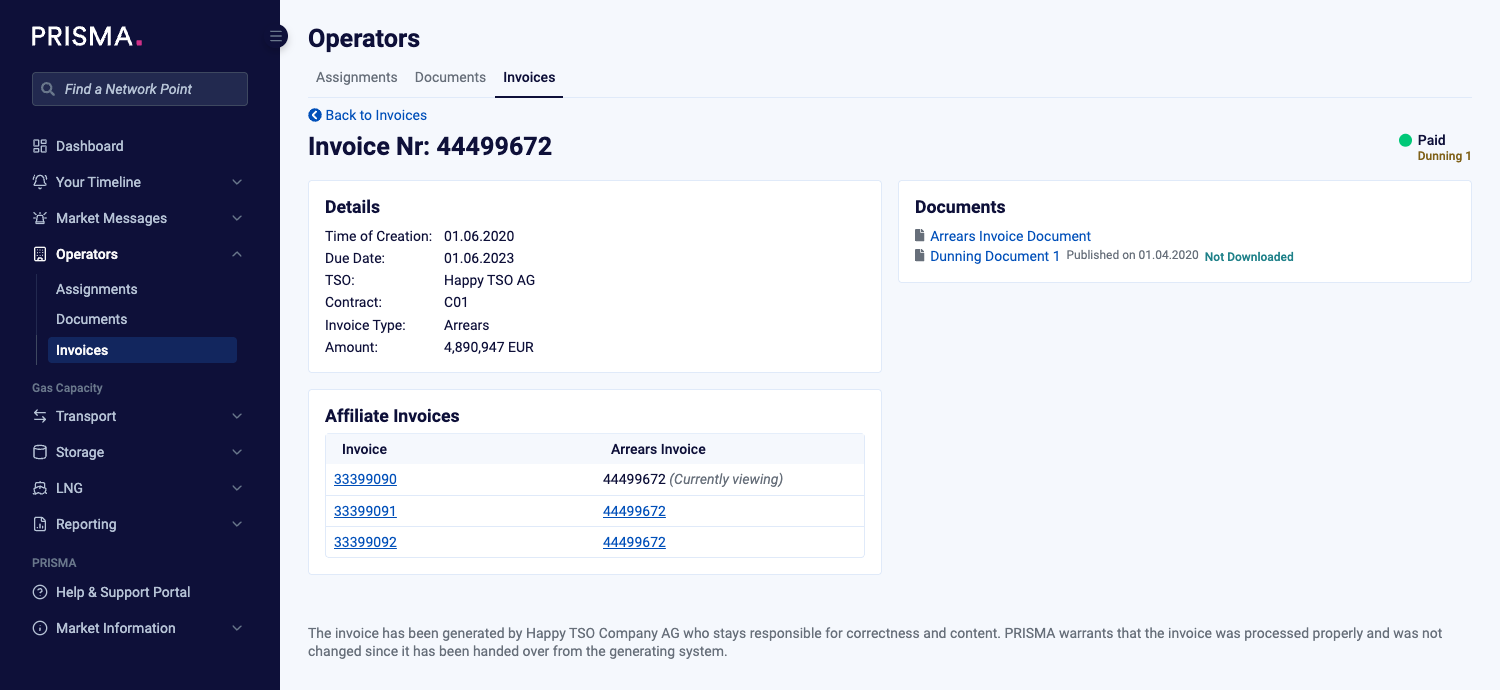
The details page of an arrears invoice, with the related invoices under Affiliate Invoices.
For further information on invoices in general, please consult: Where to View and Download Your Invoices?
If you think an invoice is wrong, please consult: My invoice seems wrong to me. Who do I contact?