
The appointment of a shipper admin is done by providing the PRISMA Customer Success Team with the following mandatory documents.
You need to submit a duly completed Power of Attorney Form and the most recent copy of your company's registry extract (no older than 3 months) to helpdesk@prisma-capacity.eu.
The PoA must be signed either by the existing user admin (if there is one), or by the person(s) entitled to sign such documents on behalf of your company, as per company registry extract.
Note: The Shipper Administrator must be an already registered user for your company on the PRISMA platform. We cannot upgrade to Administrator a person who does not have an account yet.
Overview
To assign your company's first Shipper Admin (User Administrator), you submit a Power of Attorney and your company's registry extract to PRISMA's Customer Success Team. Once your company has at least one Admin, that Admin can assign the Admin Permission Group to another already-registered user directly in the app, without repeating this submission each time.
How It Works
Assigning Your Company's First Admin
To assign a Shipper Admin for the first time, submit these documents to PRISMA's Customer Success Team at:
helpdesk@prisma-capacity.eu
- A duly completed Power of Attorney form.
- Your company's most recent registry extract, no older than 3 months.
The Power of Attorney must be signed either by your company's existing user admin, if you have one, or by the person or people entitled to sign such documents on your company's behalf, as shown in your registry extract.
The Shipper Administrator must already be a registered user for your company on the PRISMA platform. PRISMA cannot upgrade a person to Administrator who doesn't yet have an account.
Assigning Additional Admins
Once your company has at least one Admin, that Admin can assign the Admin Permission Group to another already-registered user directly in the app, without submitting a new Power of Attorney for each one.
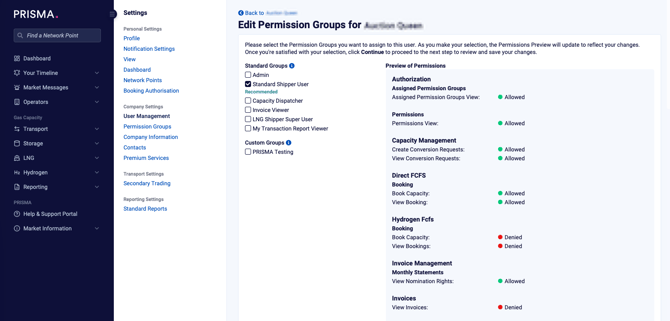
A user's current permissions, before any change: here, Standard Shipper User grants some permissions and denies others.
Once you check Admin, the Preview of Permissions updates to show "As an admin this user will be granted all permissions," with each newly gained permission tagged New.
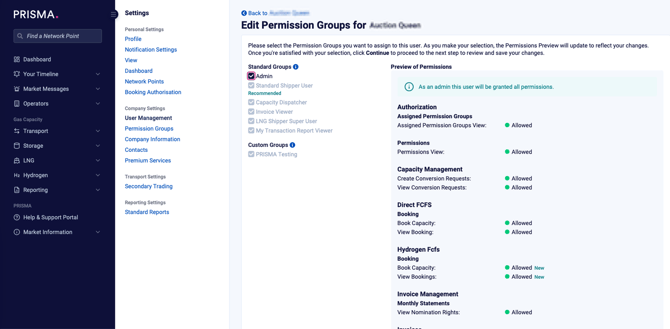
The same user with Admin checked instead: every permission previews as Allowed, with newly gained ones tagged New.
Click Continue, then confirm the change in the Confirm Admin Permission Group Assignment dialog that appears:
"Assigning the admin permission group grants the user all admin rights. This includes but is not limited to the deactivation of admin-users, upgrade of users to admins, company or user administration, and de-/activation of services."